

Openlist是在知名开源网盘列表程序Alist在被出售给商业公司(趋势)后,其部分贡献者另起炉灶而诞生的一个项目。
这是一款开源的网盘聚合工具,支持多种存储提供商,包括本地存储、阿里云盘、OneDrive 和 Google Drive 等。用户可以通过简单的命令安装 OpenList,并根据官方说明进行配置。
用户在部署了openlist之后,可以使用自定义代码进行美化
以下内容openlist和alist通用
话不多说,先看效果
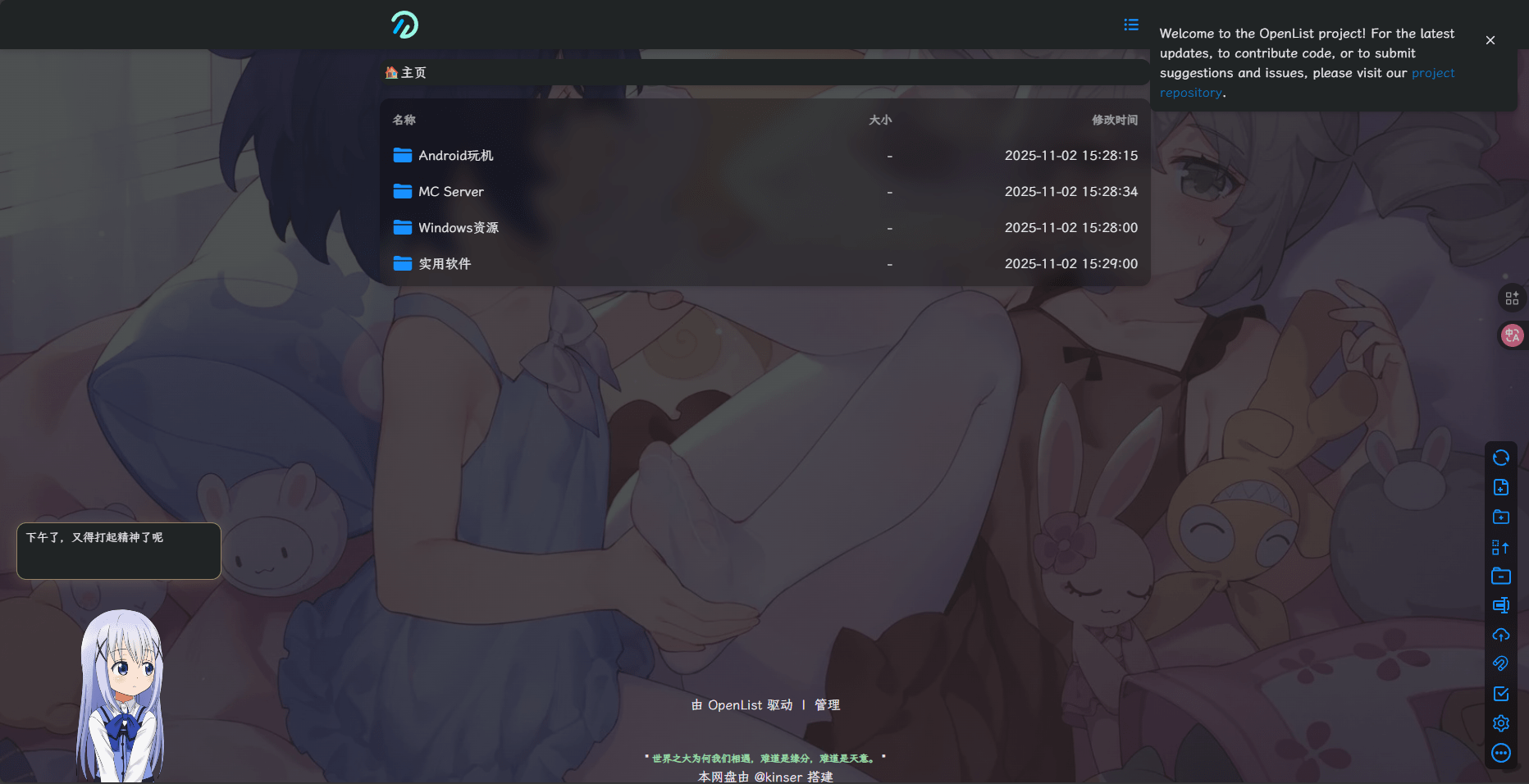
在这里改

头部代码:
<!-- v1 -->

<!-- 引入自定义字体 -->
<link rel="stylesheet" href="https://s4.zstatic.net/ajax/libs/lxgw-wenkai-webfont/1.7.0/lxgwwenkai-regular.min.css">

<style>
    /* 移除原生视频控件 */
    video::-webkit-media-controls {
        display: none;
    }

    /* 设置背景图片样式 */
    body {
        background-repeat: no-repeat;
        background-size: cover;
        background-attachment: fixed;
        background-position: center;
    }

    /* 在此处的url()里修改背景图片地址 */
    /* 加了个深色遮罩,爱护你的眼睛 */
    body.hope-ui-dark {
        background-color: rgb(32, 36, 37);
        background-image: linear-gradient(rgba(32, 36, 37, 0.8), rgba(32, 36, 37, 0.8)), url('https://t.alcy.cc/moez');
    }

    /* 在此处的url()里修改背景图片地址 */
    body.hope-ui-light {
        background-image: url('https://t.alcy.cc/moez');
    }

    /* 统一站点公告的样式 */
    .hope-ui-light .hope-c-PJLV-ikJQsXT-css {
        background: rgba(255, 255, 255, 0.8) !important;
        backdrop-filter: blur(0) !important;
    }

    .hope-ui-dark .hope-c-PJLV-ikJQsXT-css {
        background: rgb(32, 36, 37) !important;
        backdrop-filter: blur(0) !important;
    }

    /* 自定义字体 */
    * {
        font-family: "LXGW WenKai", sans-serif;
    }

    /* 添加毛玻璃效果类 */
    .glass-effect {
        backdrop-filter: blur(10px);
        -webkit-backdrop-filter: blur(10px);
    }
</style>

<!-- 看板娘 -->
<script>if (localStorage.getItem('modelId') === null) {
        localStorage.setItem('modelId', '9'); // 设置默认模型ID
        localStorage.setItem('modelTexturesId', '0'); // 设置默认皮肤ID
    }
</script>
<script src="https://cdn.mmoe.work/live2d-widget/autoload.js"></script>

<script src="https://s4.zstatic.net/ajax/libs/js-polyfills/0.1.43/polyfill.min.js?features=String.prototype.replaceAll"></script>
内容代码:
<!-- v3 -->
<!-- 修正部分区域的透明 -->
<style>
    .hope-ui-light,
    .hope-ui-dark {
        --hope-colors-background: transparent;
    }
</style>

<script type="module">
    // v3

    // 提供用来监听代码控制的 url 变化的事件
    (() => {
        const wrapHistoryMethod = (type) => {
            const orig = history[type];
            return function (...args) {
                const rv = orig.apply(this, args);
                const event = new CustomEvent(type, { detail: args });
                window.dispatchEvent(event);
                return rv;
            };
        };
        history.pushState = wrapHistoryMethod('pushState');
        history.replaceState = wrapHistoryMethod('replaceState');
    })();

    class Beautifier {
        /**
            * Beautifier 类用于美化页面背景色
            *
            * 其提供了3个方法:
            * - observe: 开始监听页面变化并美化背景色
            * - disconnect: 停止监听页面变化
            * - undo: 恢复页面背景色到默认状态
            *
            * 可以通过window.beautifier访问实例对象
            *
         */
        static ignoredSelectors = [
            '.hope-tooltip',
            '.hope-tooltip__arrow',
            '.hope-checkbox__control',
            '.hope-modal__overlay',
            'button:not(.hope-menu__trigger)',
            'svg'
        ];

        static getSelector(mainSelector) {
            return `${mainSelector} :not(${Beautifier.ignoredSelectors.join('):not(')})`;
        }

        static lightSelector = Beautifier.getSelector('.hope-ui-light');
        static darkSelector = Beautifier.getSelector('.hope-ui-dark');

        static lightBgColor = 'rgba(255, 255, 255, 0.8)';
        static darkBgColor = 'rgb(32, 36, 37)';

        static specificPrefix = 'rgba(132, 133, 141';

        constructor() {
            this.observer = null;
        }

        /**
         * @param {'light'|'dark'} theme
         */
        #rewriteBgColor(theme) {
            let selector = theme === 'light' ? Beautifier.lightSelector : Beautifier.darkSelector;
            let bgColor = theme === 'light' ? Beautifier.lightBgColor : Beautifier.darkBgColor;

            document.querySelectorAll(selector).forEach(element => {
                const computedStyle = getComputedStyle(element);

                if (computedStyle.backgroundImage !== 'none') {
                    return;
                }

                if (computedStyle.backgroundColor !== 'rgba(0, 0, 0, 0)' &&
                    !computedStyle.backgroundColor.startsWith(Beautifier.specificPrefix)) {
                    element.style.backgroundColor = bgColor;
                    element.setAttribute('data-beautified', 'true');
                }
            });
        }

        #beautify() {
            if (!location.pathname.startsWith('/@manage') && !location.pathname.startsWith('/@login')) {
                this.#rewriteBgColor('light');
                this.#rewriteBgColor('dark');
            }
        }

        observe() {
            this.observer = new MutationObserver(this.#beautify.bind(this));
            this.observer.observe(document.getElementById('root'), {
                childList: true,
                subtree: true
            });

            this.#beautify();
        }

        disconnect() {
            if (this.observer) {
                this.observer.disconnect();
            }
        }

        undo() {
            this.disconnect();

            document.body.querySelectorAll('[data-beautified]').forEach(element => {
                element.style.backgroundColor = '';
                element.removeAttribute('data-beautified');
            });
        }
    }

    const beautifier = new Beautifier();
    window.beautifier = beautifier;

    beautifier.observe();

    // 一个愚蠢到有点无敌的修复机制,不过工作良好
    (() => {
        function fixLogin(pathname) {
            if (pathname.startsWith('/@login')) {
                beautifier.undo();
            }
            else {
                beautifier.disconnect();
                beautifier.observe();
            }
        }

        ['popstate', 'pushState', 'replaceState'].forEach(eventType => {
            addEventListener(eventType, () => {
                fixLogin(location.pathname);
            });
        });
    })();
</script>

<!-- 延迟加载 -->
<div id="customize" style="display: none;">
    <div>
        <br />
        <center class="dibu">
            <div style=" line-height: 20px;font-size: 9pt;font-weight: bold;">
                <span>
                    "
                    <span style="color: rgb(154, 216, 166); font-weight: bold;" id="hitokoto">
                        <a href="#" id="hitokoto_text">
                            探索科技,启迪技能
                        </a>
                    </span> "
                </span>
            </div>

<div class="copyright" align="center">
    <div class="about">
            <span class="run_item">
                 <span class="link">本网盘由</span>
                 </span><a href="https://github.com/Qingizi7" target="_blank">@kinser</a>
                <span class="link">搭建</span>
            </span>
        </div>
    </div>
    <div class="state">
        <p>免责声明:本站为个人网盘,网盘所发布的一切资源仅限用于学习和研究目的</p>
    </div>
    <div class="by">
        <span>Powered By</span>
        <a href="https://alist.nn.ci/zh/" target="_blank">
            <span>Alist</span>
            <div class="xhx"></div>
        </a>
        <span> ©2025 All Rights Reserved.
     </div>
     <div class="by">
        <a href="/@login">登录页面</a><span>| <a href="https://alist.nn.ci/zh/">由Alist驱动</a><span> | </span><a href="/@manage">管理页面</a>
        </div>
</div>
<div class="copyright" align="center">
<a href="https://icp.gov.moe/?keyword=20250156" target="_blank">萌ICP备20250156号</a>

    <!--一言API-->
    <script src="https://v1.hitokoto.cn/?encode=js&select=%23hitokoto" defer></script>
<!--延迟加载范围到这里结束-->
</div>

<!-- 延迟加载JS -->
<script>
    let interval = setInterval(() => {
        if (document.querySelector(".footer")) {
            document.querySelector("#customize").style.display = "";
            clearInterval(interval);
        }
    }, 200);
</script>
可以自己改动一些内容,这样就是你的了😋